 KDPika Licensing
Sign inStart free
KDPika Licensing
Sign inStart freeChoose where purchase confirmation, license issuance and application authorization live before copying an integration example.
What you will learn
- Separate buyer-facing clients from backend credentials and payment verification.
- Choose a practical flow for desktop, SaaS, plugin or CLI software.
- Understand offline, migration, seat and recovery trade-offs without inventing platform capabilities.
Prerequisites
- Read core concepts and authentication.
- Complete one Sandbox quickstart.
- Identify your store, trusted backend, buyer identity model and valuable protected actions.
Shared trust boundaries
| Boundary | Responsibility | Credential rule |
|---|---|---|
| Store/provider | Confirms payment/refund/subscription state | Provider secrets stay on your backend |
| Your fulfillment backend | Verifies incoming store data, maps purchases and issues/delivers licenses durably | Product/environment-scoped lmp_ key; never distributed |
| KDPika Licensing | Manages license/device lifecycle and signed responses | Public X-App-ID for activation; installation act_ for validation |
| Your buyer application | Verifies signed result and restrictively checks validity/features | Public App ID and its own protected installation token, not developer/store keys |
| Your valuable remote service | Authenticates caller and authorizes tenant/resource/action | Your application's session/service authorization plus current licensing policy |
KDPika Licensing bills developers for their workspace. It does not become the merchant of record or process payments from your software buyers merely because you use a licensing API. Your store and fulfillment backend handle those transactions. Signed webhooks are notifications, not access tokens or payment confirmations from a browser.
Desktop application with your own website
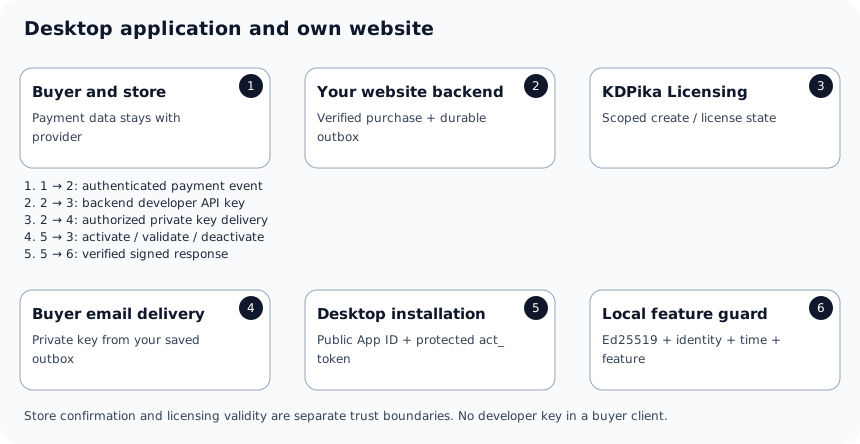
- The buyer purchases through your chosen store/payment provider.
- Your website backend verifies the provider event or confirmed API state.
- It maps the purchased item to one product plan and records a stable order-line effect before issuing.
- It saves the returned complete key in an encrypted outbox and delivers it privately.
- The desktop app activates with the public App ID, key, optional matching email and its stable installation ID.
- It verifies the signed response and uses a restrictive validity/feature guard.
- Subsequent checks follow the signed validation/offline policy; a transfer releases or resets the prior device deliberately.
Expected result: your client never has the developer API key and your website never relies on a success-page URL as payment proof. The complete Python/Electron/C# sample applications demonstrate client behavior; manual issuance demonstrates the supported backend creation/delivery boundary.
| Decision | Benefit | Trade-off |
|---|---|---|
| Verified local cache with bounded offline policy | Temporary network loss need not stop valid access | Revocation/feature changes are not instantaneous in an offline client |
| Email-matched activation | Optional check against the stored recipient email | Not proof of a human identity and not a substitute for verified purchase |
| Backend-controlled high-value actions | Local patching cannot directly grant remote access | You operate authenticated server authorization and availability |
| Encrypted key outbox | Authorized resend without issuing again | You must protect the encryption key, backups, recipients and retention |
SaaS backend
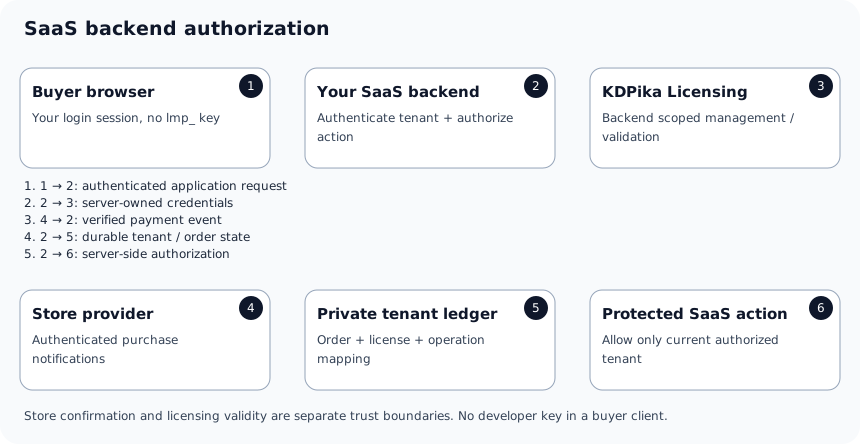
- Authenticate the buyer using your own application login.
- Resolve the caller's authorized tenant; do not accept an arbitrary browser-supplied license ID as ownership.
- Process store events on your backend and keep the tenant/order/license relationship durably.
- Use the backend developer key only for management operations scoped to that product/environment.
- If your backend uses an installation activation/token workflow, define its stable service identity and protect that token like a secret.
- Verify signed activation/validation results and enforce the valid feature/tenant decision before a protected action.
- Reconcile refused/expired state without substituting a stale notification for authorization.
Expected result: a browser session can call only resources its tenant owns; license metadata never becomes an unauthenticated bearer permission. The PHP backend sample demonstrates a guarded server route. A license GET summary is an authenticated management response, not an Ed25519 activation envelope or the caller's application login.
| Decision | Benefit | Trade-off |
|---|---|---|
| Authorization on your backend | Central enforcement of valuable online operations | You must implement tenant/caller ownership and audit decisions |
| Per-tenant service installation | Clear token/license mapping | Counts/identity must match your product's installation policy |
| Cached licensing result | Lower latency and reduced API volume | Define bounded staleness; never turn an explicit refusal into fallback permission |
| Separate commercial seat model | Can reflect named people and memberships | Platform device counts do not implement your SaaS user directory |
Plugin or extension sold in a marketplace
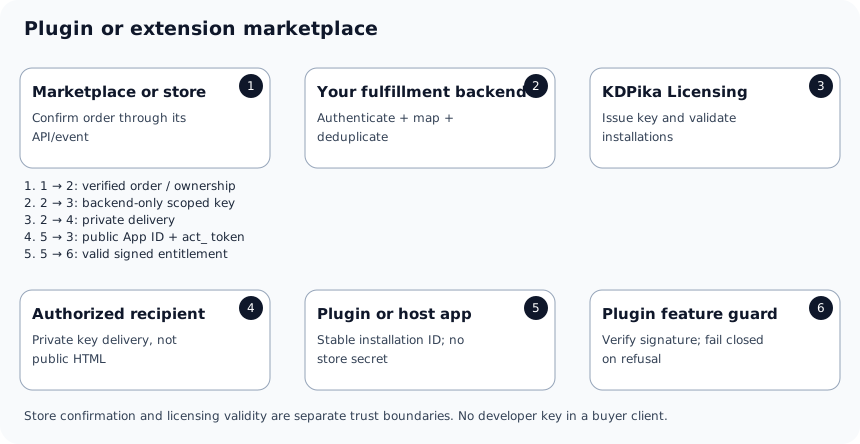
- Confirm how the marketplace exposes a verifiable completed purchase or ownership result.
- Verify its notification/API response on your backend before mapping a product plan.
- Store marketplace account, item/order-line and recipient context alongside the license ID.
- Deliver the key through an authenticated private channel, not public extension configuration or a webpage source.
- Activate the plugin using a stable installation ID appropriate to the host application.
- Verify result signature, identity, expiry and feature types before allowing local or remote functionality.
- Route transfer/refund/support actions through your own verified ownership workflow.
Expected result: a copied public plugin package does not reveal a developer/provider key. A marketplace compatibility requirement is not automatically a KDPika feature: if the marketplace has no authenticated event mechanism, use its supported server API verification or a reviewed manual process rather than inventing an HMAC header.
| Decision | Benefit | Trade-off |
|---|---|---|
| Host installation identity | Works without collecting hardware serial numbers | Define how host reinstall/profile clones affect devices |
| PHP/Node backend keeps management secret | Public plugin contains only client-safe identity and local token | Server-side plugin code shipped to a customer is still under that customer's control |
| Optional own backend for premium content | Remote authorization can protect downloads/services | You operate that service and buyer authentication |
| Domain/site labels | Helpful diagnostics | A site URL or domain string is not a built-in cryptographic domain-binding entitlement |
Do not promise WordPress domain-locked licenses, named-site transfer quotas, marketplace payout processing or automatic update-distribution APIs from the present licensing contract. Confirm those separate requirements before offering them commercially.
CLI tool and headless environments
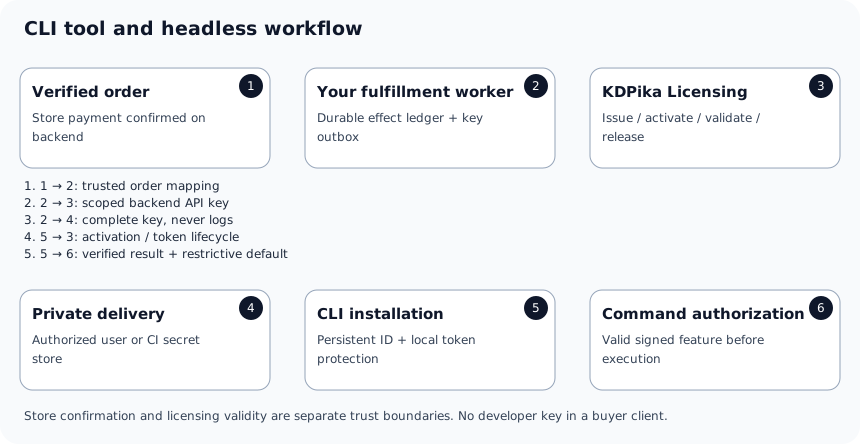
- Issue the key from a verified purchase using your backend ledger.
- Deliver it to the authorized user or a reviewed CI secret store.
- Generate one stable random installation ID for the intended installation scope.
- Activate without printing keys or tokens to terminal output or CI logs.
- Persist tokens using the supported storage approach.
- Verify the signed result before running protected commands; return a clear nonzero refusal when access fails.
- Release an installation when appropriate; do not assume reset clears lifetime activation limits.
Expected result: the Python/Go/Java CLI examples exercise activation, validation, feature gating, offline behavior, deactivation and error UX. Headless input/output is not a reason to distribute the developer API key.
| Decision | Benefit | Trade-off |
|---|---|---|
| Persistent identity on a workstation | Predictable device binding across runs | Protect the user's profile and recovery process |
| Ephemeral CI runners | Disposable build execution | A new identity per runner can consume active/lifetime allowances; define a permitted runner policy first |
| Separate license per CI installation | Clear accounting | More licenses/support records; do not share one activation token across machines |
| Offline CLI operation | Works during eligible transport failures | Clock/cache integrity is local, not a trusted hardware guarantee |
Choose before implementation
| Question | Record this decision |
|---|---|
| Who confirms the purchase? | Your provider-authenticated backend; never the client success page |
| Who owns a license? | Your verified customer/tenant/order mapping in the intended environment |
| What counts as a device or seat? | Stable installation scope, with explicit distinction from named users/concurrency |
| When does paid access end? | Actual stored expiry and signed policy, reconciled with the store period |
| What happens after a timeout? | Durable held review and reconciliation, not automatic repeated create/renew |
| How can the customer recover? | Authorized portal/device release or saved-key delivery/replacement process |
| What remains valuable on a patched client? | Remote operations protected by your own server authorization |
Expected result
Your architecture has a clear purchase-verification boundary, backend-only management secrets, installation-safe credentials and a deliberate authorization/recovery policy. These diagrams describe supported relationships, not evidence of a completed marketplace app, live payment or production availability.
Common mistakes
- Using a developer API key in an Electron renderer, browser page, distributed plugin or CLI configuration.
- Confusing a developer workspace subscription with the buyer's product plan.
- Treating webhook notifications, key masks or an unsigned license summary as signed client authorization.
- Assuming device counts implement named-user seats or a copied domain string proves domain ownership.
Security notes
TLS, verified signatures and encrypted local state are useful controls, not a promise that local software cannot be patched. Apply the threat model, protect high-value remote actions and record only privacy-justified installation/customer metadata. Keep Sandbox and Live keys, mappings, recipients and endpoints separated. Never collect card/CVC data in the licensing backend to make any architecture work.
Troubleshooting
| Symptom | Design boundary | Action |
|---|---|---|
| Browser needs a developer key | Management calls were placed on the wrong side of the trust boundary | Move them to your authenticated backend |
| New CI job consumes another device | Installation identity is ephemeral | Define a supported persistent/separate-runner license policy |
| Marketplace refund changes another customer | Order/license ownership mapping is incomplete | Verify provider/account/environment/order line before mutation |
| SaaS request supplies another tenant's license ID | Resource ownership is not authorized | Resolve the caller's tenant on your backend and refuse cross-tenant access |
| Old feature persists offline | Valid cached snapshot has bounded staleness | Follow the signed policy; use remote authorization when immediate control is necessary |
Next steps
Choose the licensing recipes that your architecture requires, then test manual issuance and uncertain-result handling before adding store automation.