 KDPika Licensing
Sign inStart free
KDPika Licensing
Sign inStart freeActivate once for an installation, validate its current license state, and deactivate when deliberately releasing that installation.
What you will learn
- Follow six real outcomes without confusing transport success with authorization.
- Persist identity and token state safely.
- Explain failures to users without exposing credentials.
Prerequisites
- Complete the quickstart.
- Read authentication and license lifecycle.
- Keep client time reasonably accurate and protect local application data.
First run
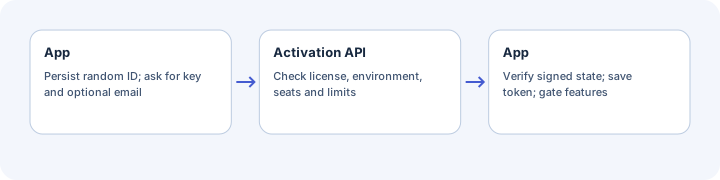
- Generate a random installation ID once and persist it.
- Ask for the license key and, if your UX requires it, the customer email.
- Send POST /api/v1/licenses/activate with X-App-ID and explicit X-Environment.
- Verify the signed response and its product, environment, installation, status and deadlines.
- Only after a valid result, persist the activation token and signed cache.
- Require validity before enabling a feature.
Expected result: one active installation and a token bound to its license/device.
The device_id must be a trimmed 16–255 character string. A random UUID meets this shape. Do not derive it from a MAC address, disk serial, username or unconsented tracking identifier.
Normal run
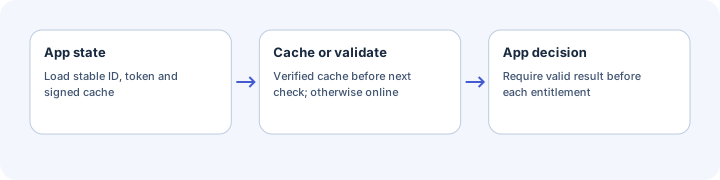
Before next_validation_at, official SDKs can use a verified cache after semantic checks. Otherwise they request POST /api/v1/licenses/validate using the token and X-Installation-ID.
Re-activating the same active installation rotates its token without adding an active seat or another cumulative activation. Do not activate on every launch when a valid stored token already exists.
Offline or timeout
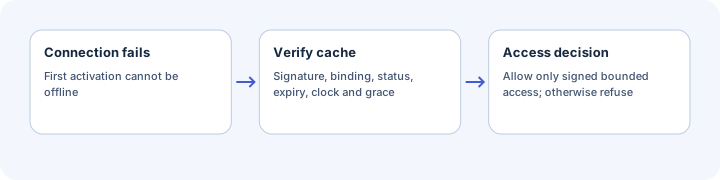
A transport failure can use a verified cache only within offline_grace_until and license expiry. A first activation cannot be completed offline. Missing, invalid or out-of-window cache must not unlock features.
The product defaults are 24 hours for normal validation and 168 hours for offline grace. Dashboard policy accepts 1–168 validation hours and 0–720 grace hours. Both deadlines are absolute offsets from signed server_time; grace is not added after the validation interval.
Force-online validation bypasses the early cache shortcut but can still fall back within grace on a transport failure. It is not a guaranteed internet-required/fail-closed switch.
Suggested user message: “We could not connect. You can continue until the date shown; please reconnect before then.” Show that date only from a valid signed allowance.
Revoked or suspended
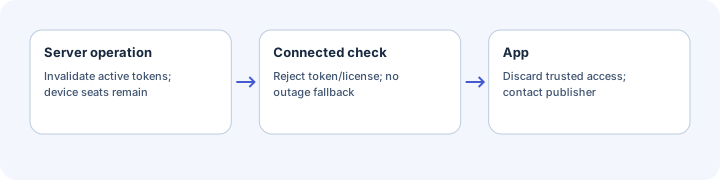
A server rejection is not an outage and does not qualify for offline fallback. Suspension/revocation invalidate active tokens; validation may return INVALID_TOKEN, while a new activation can return LICENSE_SUSPENDED or LICENSE_REVOKED.
Suggested message: “This license is not available. Please contact the application publisher.” Do not reveal whether another person's email or license exists.
A disconnected app may still use its previously signed allowance until it reconnects or reaches a deadline; revocation is not instantaneous offline.
Expired
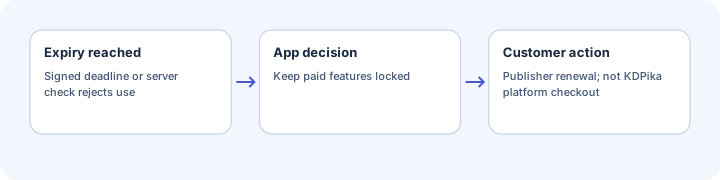
A local signed expiry or server check can reject the license. Before cron, a check may return LICENSE_EXPIRED; after token invalidation, INVALID_TOKEN can be returned. Use the known signed state and confirmed server result, not a fabricated payment explanation.
Suggested message: “Your license has ended. Contact the publisher or renew through their purchase page.” KDPika platform checkout is not the publisher's software-buyer renewal page.
Device or activation limit
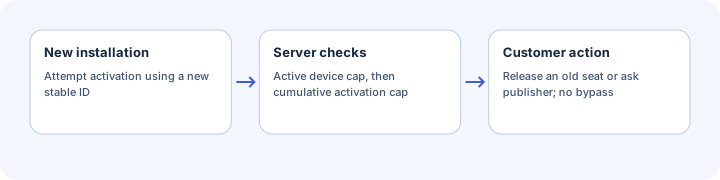
DEVICE_LIMIT_REACHED 409 means active seats are full. ACTIVATION_LIMIT_REACHED 409 means cumulative activations are exhausted. Releasing a seat does not reset the cumulative count.
Suggested message: “This license has reached its installation limit. Remove an old installation or contact the publisher.” Display a self-service portal link only if the publisher supplied a valid one.
Deactivation and reinstall
POST /api/v1/licenses/deactivate uses the activation token, deactivates its bound device and invalidates active tokens for that device. Repeat use of the old token returns INVALID_TOKEN, not a second successful operation.
Only clear local activation state after a confirmed success when the intention is to release a seat. Deleting local files alone does not tell the server that a device was released.
Persist the random identity in a stable per-user application-data directory across normal restarts. Reinstalling or losing that directory may create a new installation and require an explicit transfer/recovery policy.
Local state and OS differences
| State | Storage rule |
|---|---|
| Installation ID | Persist once; reuse for activation and X-Installation-ID |
| Activation token | Protected per-user storage; never logs or shared bundles |
| Signed response | Verify on every use; cached JSON is not inherently trusted |
| Verification key | Trust HTTPS retrieval or a deliberately pinned public key; plan rotation |
| Clock checkpoint | Detect ordinary rollback; not trusted hardware or snapshot prevention |
Python can optionally use an OS keyring. PHP, JavaScript and C# use permission-protected files unless you add another layer. Windows ACLs, macOS Keychain and Linux credential-service availability need OS-specific testing. Do not promise native secure storage from a file-permission fallback.
Expected result
You can draw the allowed access path and the refusal path for every outcome, and show plain user messages without overriding an invalid result.
Common mistakes
- Generating a new device_id on every launch.
- Accepting features from a result whose valid flag is false.
- Treating SIGNATURE_INVALID as permission to ignore signatures.
- Confusing a timeout with a confirmed revoked-license decision.
- Claiming a local mutable clock checkpoint prevents every machine snapshot attack.
Security notes
The outer success flag, token and request ID are not a replacement for signed payload validation. Your app must enforce the feature gate. A patched local binary remains a limitation; server-side authorization is needed for valuable online resources.
Troubleshooting
| Symptom | Cause | Fix |
|---|---|---|
| New device on every run | Identity not persisted | Reuse the installation file in a stable location |
| Another machine's token fails | Installation binding differs | Activate that installation under the customer's policy |
| Cache rejected in C# | Known Unicode serialization issue | Do not bypass verification; test online and consult compatibility notes |
| JS rejects price 19.00 | Integral-float canonicalization mismatch | Treat as SDK compatibility failure; consult notes before production |
| Offline access ends sooner than expected | Grace and expiry are absolute deadlines | Compare signed server_time, next_validation_at, offline_grace_until and expires_at |
Next steps
Adapt the use-case architecture and complete the go live checklist.