 KDPika Licensing
Sign inStart free
KDPika Licensing
Sign inStart freeRun a complete Sandbox activation, signed online validation, feature check and deactivation with an official SDK.
This page preserves the earlier quickstart for reference. Its Python 1.0.0 install commands are legacy instructions, not the current recommendation. Use the current quickstart and Python SDK 1.1.5 for a new integration.
What you will learn
- Create a product, product plan, feature and customer license.
- Run Python, JavaScript, PHP or C# against the same API.
- Verify that deactivation releases the active device seat.
Prerequisites
- A verified account with an available Sandbox allowance.
- One installed runtime from the setup sections below.
- Internet access and permission to write your application-data directory.
- Read authentication and integration limitations.
The integration targets five minutes once your account, runtime and SDK download are ready. Email delivery and dependency installation can take longer; this is not a completion-time guarantee.
Create the Sandbox records
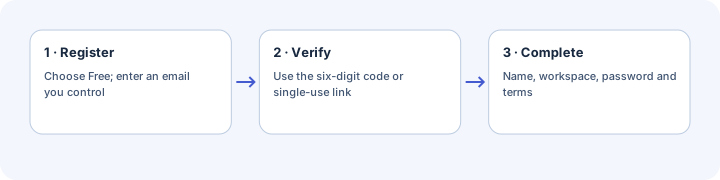
Verify your account
- Open registration, select Free for evaluation and submit an email you control.
- Use the message's six-digit code or secure link.
- Complete your name, workspace, password and terms acknowledgement.
Expected result: a Sandbox workspace opens after email proof. Paid selections require confirmed platform payment, not automatic conversion to Free.
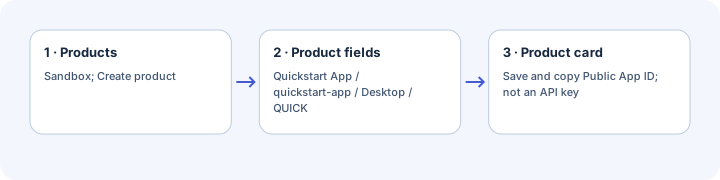
Create your product
- Select Sandbox in the workspace header.
- Open Products and choose New product or Create product.
- Enter Product name Quickstart App, Slug quickstart-app, Platform Desktop and License prefix QUICK.
- Choose Create product.
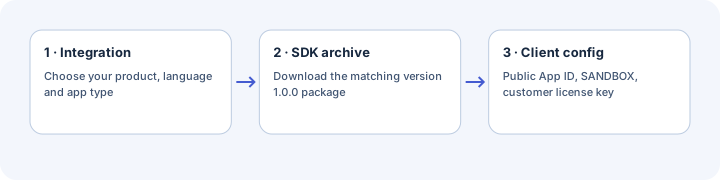
- Copy the public App ID shown on the product card.
Expected result: the card identifies your application. The public App ID is not a secret management key.
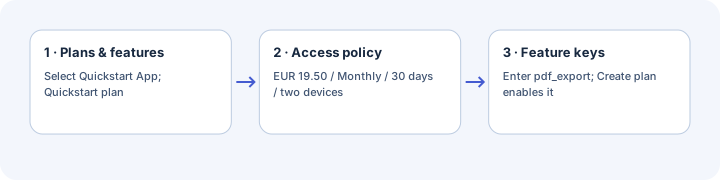
Create your plan and feature
- Open Plans & features and choose New plan or Create plan.
- Select Quickstart App; enter Plan name Quickstart plan and Slug quickstart-plan.
- Set Price 19.50, Currency EUR, Billing type Monthly and Duration days 30.
- Set Max devices 2 and Feature keys pdf_export.
- Choose Create plan.
Expected result: the plan enables the boolean pdf_export feature. This product-plan price is metadata; it does not charge anyone.
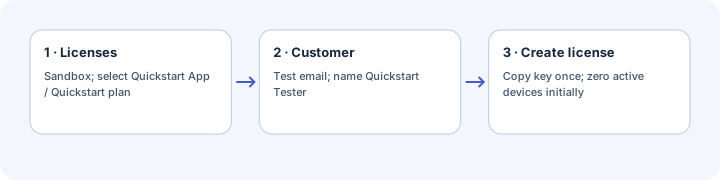
Issue a test license
- Open Licenses in Sandbox and choose New license or Create license.
- Select Quickstart App / Quickstart plan.
- Enter your test Customer email and an ASCII Customer name such as Quickstart Tester.
- Choose Create license.
- Copy the one-time full license key and keep it private.
Expected result: the active license has zero active devices. The associated customer is created or reused automatically.
Download your SDK
- Open Integration in your signed-in workspace.
- Select the product, language and application type.
- Download the matching version 1.0.0 SDK archive.
Expected result: kdpika-python-sdk-1.0.0.tar.gz, kdpika-javascript-sdk-1.0.0.tar.gz, kdpika-php-sdk-1.0.0.tar.gz or kdpika-csharp-sdk-1.0.0.tar.gz. No public package-registry publication is assumed.
Configure your environment
Bash commands below use visible example identifiers. Replace them privately; read the actual license key through a hidden prompt to avoid command-history exposure.
export KDP_APP_ID="YOUR_PUBLIC_APP_ID"
export KDP_CUSTOMER_EMAIL="YOUR_TEST_CUSTOMER_EMAIL"
export KDP_BASE_URL="https://licensing.kdpika.com"
read -r -s -p "Sandbox license key: " KDP_LICENSE_KEY
printf '\n'
export KDP_LICENSE_KEY
Expected result: the variables exist in this terminal and its children. Do not print them. A supplied customer email must match the license; key-only activation is also supported.
The command transcript uses Bash on macOS/Linux. On Windows, run it in a Bash environment with the chosen runtime installed there; this is not a native PowerShell transcript. The language samples use the SDK's OS-specific storage paths, but native Windows packaging and credential backends need separate testing.
The samples explicitly use SANDBOX. KDP_BASE_URL defaults to the hosted HTTPS origin. Only an isolated local server may use loopback HTTP; never use remote plain HTTP.
Choose a runtime
Copy the complete files below and save them with the displayed filenames. Run only your chosen runtime. Installation commands run in the folder containing the downloaded archive and sample.
Python setup
Requires Python 3.9+, SDK 1.0.0 and the tested cryptography 46.0.3 dependency. Save python.py, then run:
python3 -m venv .venv
.venv/bin/python -m pip install cryptography==46.0.3 ./kdpika-python-sdk-1.0.0.tar.gz
.venv/bin/python python.py
"""Sandbox activation, signed validation and deactivation.
Requires Python 3.11–3.14 and kdpika-licensing 1.1.5 from PyPI.
Run: python3 python.py with KDP_APP_ID and KDP_LICENSE_KEY in the environment.
Expected: activation, validated pdf_export state, then released device seat.
"""
import os
import sys
from pathlib import Path
from kdpika_licensing import LicenseClient


def required(name):
    value = os.environ.get(name, "").strip()
    if not value:
        raise ValueError("Set " + name + " before running this sample.")
    return value


def accepted(result):
    if not result.valid:
        actions = {
            "INVALID_LICENSE": "Check the key, email, App ID and Sandbox selection.",
            "DEVICE_LIMIT_REACHED": "Deactivate an old installation before retrying.",
            "ACTIVATION_LIMIT_REACHED": "Ask the publisher to review activation limits.",
            "NETWORK_ERROR": "Connect to the internet and retry.",
            "SIGNATURE_INVALID": "Stop and review the SDK compatibility notes.",
        }
        print("Stopped: " + str(result.error_code) + ". " + actions.get(result.error_code, "Review the license status and request ID."), file=sys.stderr)
        if result.request_id:
            print("Request ID: " + result.request_id, file=sys.stderr)
        raise SystemExit(1)
    return result


def main():
    state = os.environ.get("KDP_STATE_DIR")
    client = LicenseClient(product=required("KDP_APP_ID"), environment="SANDBOX",
        base_url=os.environ.get("KDP_BASE_URL", "https://licensing.kdpika.com"),
        application_name="KDPika Quickstart", application_version="1.0.0",
        storage_dir=Path(state) if state else None, prefer_keyring=False)
    accepted(client.activate(required("KDP_LICENSE_KEY"), os.environ.get("KDP_CUSTOMER_EMAIL") or None))
    print("Activation accepted; signature verified.")
    result = accepted(client.validate())
    print("Validation accepted; pdf_export=" + ("enabled." if result.feature("pdf_export") else "disabled."))
    accepted(client.deactivate())
    print("Deactivation accepted; device seat released.")


if __name__ == "__main__":
    try:
        main()
    except Exception:
        print("Stopped: check configuration, storage permissions and connectivity. Do not disable signature checks.", file=sys.stderr)
        sys.exit(1)
The demo explicitly uses permission-protected files with prefer_keyring=False. That choice is reproducible, not an assertion of native credential-store security.
JavaScript setup
Requires Node.js 18+ and the local SDK 1.0.0. Save both files, then run:
tar -xzf kdpika-javascript-sdk-1.0.0.tar.gz
npm install --ignore-scripts
node javascript.js
{
  "name": "kdpika-quickstart-sample",
  "private": true,
  "type": "module",
  "engines": {"node": ">=18"},
  "dependencies": {"@kdpika/license-sdk": "file:./kdpika-javascript-sdk"}
}
/** Sandbox activation, signed validation and deactivation.
 * Requirements: Node.js 18+, @kdpika/license-sdk 1.0.0 local package.
 * Run: node javascript.js with KDP_APP_ID and KDP_LICENSE_KEY set.
 * Expected: activation, validated pdf_export state, then released device seat.
 */
import {LicenseClient} from '@kdpika/license-sdk';

function required(name) {
  const value = (process.env[name] || '').trim();
  if (!value) throw new Error(`Set ${name} before running this sample.`);
  return value;
}
function accepted(result) {
  if (!result.valid) {
    const actions = {
      INVALID_LICENSE:'Check the key, email, App ID and Sandbox selection.',
      DEVICE_LIMIT_REACHED:'Deactivate an old installation before retrying.',
      ACTIVATION_LIMIT_REACHED:'Ask the publisher to review activation limits.',
      NETWORK_ERROR:'Connect to the internet and retry.',
      SIGNATURE_INVALID:'Stop and review the SDK compatibility notes.'
    };
    console.error(`Stopped: ${result.errorCode}. ${actions[result.errorCode] || 'Review the license status and request ID.'}`);
    if (result.requestId) console.error(`Request ID: ${result.requestId}`);
    process.exitCode = 1;
    throw new Error('License check rejected.');
  }
  return result;
}
try {
  const client = new LicenseClient({product:required('KDP_APP_ID'), environment:'SANDBOX',
    baseUrl:process.env.KDP_BASE_URL || 'https://licensing.kdpika.com',
    applicationName:'KDPika Quickstart', applicationVersion:'1.0.0', storageDir:process.env.KDP_STATE_DIR});
  accepted(await client.activate(required('KDP_LICENSE_KEY'), process.env.KDP_CUSTOMER_EMAIL || null));
  console.log('Activation accepted; signature verified.');
  const result = accepted(await client.validate());
  console.log(`Validation accepted; pdf_export=${result.feature('pdf_export') ? 'enabled.' : 'disabled.'}`);
  accepted(await client.deactivate());
  console.log('Deactivation accepted; device seat released.');
} catch {
  console.error('Stopped: check configuration, storage permissions and connectivity. Do not disable signature checks.');
  process.exitCode = 1;
}
Expected installation result: the local package is available to the ES module. Use Node or Electron main, not browser-delivered JavaScript.
PHP setup
Requires PHP 8.2+ with cURL and native Sodium. Save php.php, then run:
tar -xzf kdpika-php-sdk-1.0.0.tar.gz
export KDP_SDK_DIR="$PWD/kdpika-php-sdk"
php php.php
<?php
declare(strict_types=1);
// Purpose: Sandbox activation, signed validation and deactivation.
// Requires PHP 8.2+, cURL, Sodium and SDK 1.0.0 source in KDP_SDK_DIR.
// Run: php php.php with KDP_APP_ID and KDP_LICENSE_KEY set.
// Expected: activation, validated pdf_export state, then released device seat.
use KDPika\LicenseSdk\{LicenseClient, LicenseResult};

function required(string $name): string {
    $value = trim((string)getenv($name));
    if ($value === '') throw new RuntimeException('Set '.$name.' before running this sample.');
    return $value;
}
function accepted(LicenseResult $result): LicenseResult {
    if (!$result->valid) {
        $action = match($result->errorCode) {
            'INVALID_LICENSE' => 'Check the key, email, App ID and Sandbox selection.',
            'DEVICE_LIMIT_REACHED' => 'Deactivate an old installation before retrying.',
            'ACTIVATION_LIMIT_REACHED' => 'Ask the publisher to review activation limits.',
            'NETWORK_ERROR' => 'Connect to the internet and retry.',
            'SIGNATURE_INVALID' => 'Stop and review the SDK compatibility notes.',
            default => 'Review the license status and request ID.',
        };
        fwrite(STDERR, 'Stopped: '.$result->errorCode.'. '.$action.PHP_EOL);
        if ($result->requestId) fwrite(STDERR, 'Request ID: '.$result->requestId.PHP_EOL);
        exit(1);
    }
    return $result;
}
try {
    $sdk = required('KDP_SDK_DIR');
    require $sdk.'/src/LicenseResult.php';
    require $sdk.'/src/LicenseClient.php';
    $client = new LicenseClient(product:required('KDP_APP_ID'), environment:'SANDBOX',
        baseUrl:getenv('KDP_BASE_URL') ?: 'https://licensing.kdpika.com',
        applicationName:'KDPika Quickstart', applicationVersion:'1.0.0',
        storageDir:getenv('KDP_STATE_DIR') ?: null);
    accepted($client->activate(required('KDP_LICENSE_KEY'), getenv('KDP_CUSTOMER_EMAIL') ?: null));
    echo 'Activation accepted; signature verified.', PHP_EOL;
    $result = accepted($client->validate());
    echo 'Validation accepted; pdf_export=', $result->feature('pdf_export') ? 'enabled.' : 'disabled.', PHP_EOL;
    accepted($client->deactivate());
    echo 'Deactivation accepted; device seat released.', PHP_EOL;
} catch (Throwable) {
    fwrite(STDERR, 'Stopped: check configuration, storage permissions and connectivity. Do not disable signature checks.'.PHP_EOL);
    exit(1);
}
The two source files load directly without a public Composer package. PHP 8.2 is required by the readonly result class despite the lower package metadata minimum.
CSharp setup
Requires a .NET 7-compatible SDK and local KDPika SDK 1.0.0. BouncyCastle.Cryptography is pinned to 2.7.0 in the SDK project. Save both files, then run:
tar -xzf kdpika-csharp-sdk-1.0.0.tar.gz
dotnet restore Quickstart.csproj
dotnet run --project Quickstart.csproj --no-restore
<Project Sdk="Microsoft.NET.Sdk">
  <PropertyGroup><OutputType>Exe</OutputType><TargetFramework>net7.0</TargetFramework><ImplicitUsings>enable</ImplicitUsings><Nullable>enable</Nullable><EnableDefaultCompileItems>false</EnableDefaultCompileItems></PropertyGroup>
  <ItemGroup><Compile Include="Program.cs" /></ItemGroup>
  <ItemGroup><ProjectReference Include="kdpika-csharp-sdk/KDPika.LicenseSdk/KDPika.LicenseSdk.csproj" /></ItemGroup>
</Project>
// Purpose: Sandbox activation, signed online validation and deactivation.
// Requires .NET 7 SDK, KDPika SDK 1.0.0, BouncyCastle.Cryptography 2.7.0.
// Run: dotnet run --project Quickstart.csproj with KDP_APP_ID/KDP_LICENSE_KEY set.
// Expected: activation, validated pdf_export state, then released device seat.
using KDPika.LicenseSdk;

string Required(string name) => Environment.GetEnvironmentVariable(name)?.Trim() is {Length: > 0} value
    ? value : throw new ArgumentException("Set " + name + " before running this sample.");
LicenseResult Accepted(LicenseResult result) {
    if (!result.Valid) {
        var action = result.ErrorCode switch {
            "INVALID_LICENSE" => "Check the key, email, App ID and Sandbox selection.",
            "DEVICE_LIMIT_REACHED" => "Deactivate an old installation before retrying.",
            "ACTIVATION_LIMIT_REACHED" => "Ask the publisher to review activation limits.",
            "NETWORK_ERROR" => "Connect to the internet and retry.",
            "SIGNATURE_INVALID" => "Stop and review the SDK compatibility notes.",
            _ => "Review the license status and request ID."
        };
        Console.Error.WriteLine($"Stopped: {result.ErrorCode}. {action}");
        if (result.RequestId is not null) Console.Error.WriteLine("Request ID: " + result.RequestId);
        throw new InvalidOperationException("License check rejected.");
    }
    return result;
}
try {
    var client = new LicenseClient(product:Required("KDP_APP_ID"), environment:"SANDBOX",
        baseUrl:Environment.GetEnvironmentVariable("KDP_BASE_URL") ?? "https://licensing.kdpika.com",
        applicationName:"KDPika Quickstart", applicationVersion:"1.0.0",
        storageDir:Environment.GetEnvironmentVariable("KDP_STATE_DIR"));
    Accepted(await client.ActivateAsync(Required("KDP_LICENSE_KEY"), Environment.GetEnvironmentVariable("KDP_CUSTOMER_EMAIL")));
    Console.WriteLine("Activation accepted; signature verified.");
    var result = Accepted(await client.ValidateAsync());
    Console.WriteLine("Validation accepted; pdf_export=" + (result.Feature("pdf_export") ? "enabled." : "disabled."));
    Accepted(await client.DeactivateAsync());
    Console.WriteLine("Deactivation accepted; device seat released.");
} catch {
    Console.Error.WriteLine("Stopped: check configuration, storage permissions and connectivity. Do not disable signature checks.");
    Environment.ExitCode = 1;
}
Use a vendor-supported runtime for production; minimum source compatibility is not a security-support promise. Fresh online validation does not prove cached Unicode payloads work.
cURL setup
Requires Bash 3.2+, cURL 7.55+ and Python 3.9+ standard-library JSON handling. Save curl.sh and run:
bash curl.sh
#!/usr/bin/env bash
# Purpose: Sandbox activate/validate/deactivate HTTP check, not a signed verifier.
# Requires Bash 3.2+, cURL 7.55+, Python 3.9+ standard library. No SDK needed.
# Run: bash curl.sh with KDP_APP_ID and KDP_LICENSE_KEY set.
# Expected: three accepted HTTP operations; no keys/tokens printed or persisted.
set -euo pipefail
set +x
python3 - <<'PY'
import json, os, subprocess, uuid
from urllib.parse import urlsplit

def required(name):
    value = os.environ.get(name, '').strip()
    if not value: raise SystemExit('Set '+name+' before running this sample.')
    if '\n' in value or '\r' in value: raise SystemExit('Invalid value for '+name)
    return value

base = os.environ.get('KDP_BASE_URL', 'https://licensing.kdpika.com').rstrip('/')
u = urlsplit(base)
if u.username or u.password or u.query or u.fragment or u.path:
    raise SystemExit('Use an origin URL without credentials, query or path.')
if u.scheme != 'https' and not (u.scheme == 'http' and u.hostname in ('127.0.0.1','localhost','::1')):
    raise SystemExit('Use HTTPS; loopback HTTP is allowed for local tests.')

def request(action, body, headers):
    # cURL reads headers and JSON from stdin config, not secret-bearing argv/files.
    config = '\n'.join('header = '+json.dumps(k+': '+v) for k,v in headers.items())
    config += '\ndata = '+json.dumps(json.dumps(body))+'\n'
    process = subprocess.run(['curl','--silent','--show-error','--connect-timeout','10',
        '--max-time','20','--config','-','--url',base+'/api/v1/licenses/'+action,
        '--write-out','\n%{http_code}'],input=config,text=True,capture_output=True,timeout=25)
    if process.returncode: raise SystemExit('Connection failed; check the URL and network.')
    try:
        raw,status = process.stdout.rsplit('\n',1)
        result = json.loads(raw)
    except (ValueError,TypeError): raise SystemExit('The server returned an invalid response.')
    if status != '200' or result.get('success') is not True:
        code = result.get('error',{}).get('code','INVALID_RESPONSE')
        raise SystemExit(action+' rejected: '+code+'; check credentials, environment, license status and limits.')
    return result

identity = 'quickstart-'+str(uuid.uuid4())
body = {'license_key':required('KDP_LICENSE_KEY'),'device_id':identity,
        'device_name':'Quickstart cURL','platform':'cli','app_version':'1.0.0'}
if os.environ.get('KDP_CUSTOMER_EMAIL'): body['email'] = os.environ['KDP_CUSTOMER_EMAIL']
response = request('activate',body,{'Content-Type':'application/json',
    'X-App-ID':required('KDP_APP_ID'),'X-Environment':'SANDBOX'})
token = response.get('activation_token','')
if not token.startswith('act_'): raise SystemExit('Activation response is incomplete.')
print('Activation HTTP accepted; signature not verified by this transport sample.')
headers = {'Content-Type':'application/json','Authorization':'Bearer '+token,'X-Installation-ID':identity}
request('validate',{},headers)
print('Validation HTTP accepted.')
request('deactivate',{},headers)
print('Deactivation HTTP accepted; device seat released.')
print('Transport test only. Use a verified SDK result before unlocking application features.')
PY
Expected output:
Activation HTTP accepted; signature not verified by this transport sample.
Validation HTTP accepted.
Deactivation HTTP accepted; device seat released.
Transport test only. Use a verified SDK result before unlocking application features.
Expected result
Each official SDK prints:
Activation accepted; signature verified.
Validation accepted; pdf_export=enabled.
Deactivation accepted; device seat released.
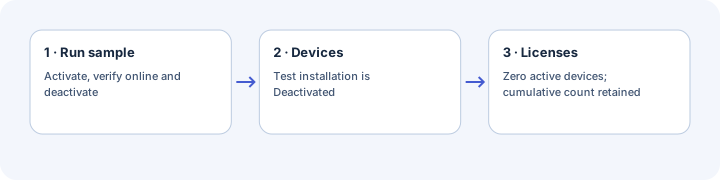
- Open Devices and inspect the test installation.
- Confirm its status is Deactivated.
- Open Licenses and confirm the active device count returned to zero.
Expected result: the seat is available again. Cumulative activation history is not reset. Reactivating a deactivated installation consumes another cumulative activation when such a maximum is configured.
Common mistakes
- Using an internal product record ID instead of the public app_ identifier.
- Supplying a different customer email or the wrong environment.
- Forgetting EUR when the current product-plan form defaults to USD.
- Reading features before valid or Valid.
- Treating fresh online success as a test of every cache, OS or numeric value.
Security notes
The examples do not print license keys, tokens or complete customer payloads. Never commit real credentials. Local state needs appropriate OS protection.
If validation fails midway, a Sandbox seat can remain active. Inspect Devices and deactivate that installation deliberately; do not reset unrelated devices.
Troubleshooting
| Symptom | Cause | Fix |
|---|---|---|
| INVALID_LICENSE | Key, App ID, Sandbox or supplied email mismatch | Compare all four privately |
| DEVICE_LIMIT_REACHED | Active seat cap reached | Deactivate an old test installation |
| ACTIVATION_LIMIT_REACHED | Cumulative cap reached | Ask the publisher to review policy; device reset does not clear the count |
| SIGNATURE_INVALID | Canonicalization issue, altered data or untrusted key | Stop; review compatibility notes; never bypass verification |
| pdf_export=disabled | Feature missing from selected plan | Inspect the product plan and correct the test license |
| Import or assembly not found | Dependency installed in another project/runtime | Repeat installation in this sample directory |
| Network error | Connectivity or origin mismatch | Check the URL and network |
Next steps
Read the activation flow, then adapt your use-case architecture.