 KDPika Licensing
Sign inStart free
KDPika Licensing
Sign inStart freeKDPika Licensing is a managed licensing service for software developers, not a checkout for their software buyers.
What you will learn
- Where licensing fits into your application.
- Which responsibilities belong to you and to KDPika.
- Which starting path fits your role.
Prerequisites
- An application you develop or maintain.
- A browser for reading these public guides. No account is required to read.
- The glossary for unfamiliar terms.
What the service does
Your organization owns products, product plans, customers and licenses. Issue a license, bind an installation, validate its current eligibility and read its features. The dashboard and management API support license operations, device management and activity inspection.
Your platform plan controls workspace capacity. A product plan defines licensing rules for your own application. These are separate commercial relationships.
What the service does not do
KDPika does not collect payments from your software buyers. Stripe and Mollie in platform checkout bill your KDPika subscription. Your own store or payment backend confirms your software sales and decides when to issue, renew, suspend or revoke a customer license.
KDPika does not package your application, guarantee that a binary cannot be patched, supply a floating-seat lease server or provide an air-gapped activation-file workflow. Do not assume an advertised capability of a different licensing provider exists here.
Architecture
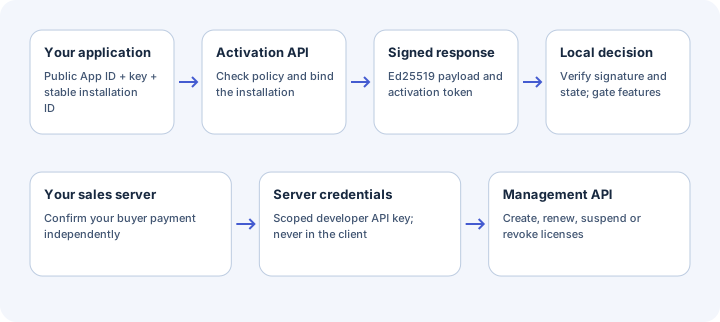
The client branch uses a public App ID plus a customer license key. After activation, it holds an activation token. It never needs a secret developer API key.
The management branch stays on your trusted server. For a sale, your backend first confirms payment with your own provider, then calls the license-management API. An untrusted success-page URL must not create an entitlement.
Start by role
Expected result
You can identify your application, your licensing backend and your separate sales backend without confusing a platform subscription with a software license.
Common mistakes
- Shipping a developer API key in an installer: client activation does not require that key.
- Expecting a platform subscription payment to sell your application: your software-buyer checkout is separate.
- Calling a device ID a hardware fingerprint: it is a stable installation identifier supplied by your app.
Security notes
Always require a valid result before reading entitlements. A signature protects integrity, not confidentiality. A user who controls the local machine may patch your application; protect valuable server resources on your backend.
Troubleshooting
| Symptom | Cause | Fix |
|---|---|---|
| Unsure whether you need an SDK | The client and management paths are mixed | Use an SDK in the application; use scoped management credentials on your backend |
| Payment succeeded but no software key exists | Your sales backend has no issuance integration | Connect confirmed order fulfilment to the management API |
| Need floating or permanently offline licensing | That model is not built in | Ask support about requirements before buying |
Next steps
Choose your path, then run the Sandbox quickstart.