 KDPika Licensing
Sign inStart free
KDPika Licensing
Sign inStart freeAllow bounded offline use only from a verified cache, never as a fallback after the server rejects a license.
What you will learn
- Configure product validation/grace policy and all four SDK clients.
- Distinguish cached, online, offline and refused states.
- Test expiry, clock rollback and server rejection.
Prerequisites
- Complete the Sandbox quickstart.
- Read signed responses.
- Use a separate test license, private state directory and trusted test clock.
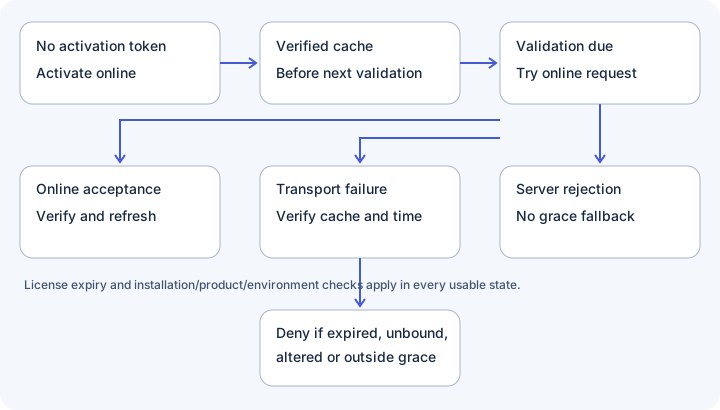
Policy and state flow
| Product setting | Default | Dashboard accepted range | Meaning |
|---|---|---|---|
| validation_interval_hours | 24 hours | 1–168 hours | next_validation_at = server_time + this duration |
| offline_grace_hours | 168 hours | 0–720 hours | offline_grace_until = server_time + this duration |
These are product settings, not constructor parameters. Open Products, edit the product's validation policy, save and validate online to obtain new signed deadlines. Existing disconnected caches retain their old signed deadlines.
Grace is not added after the interval. With defaults, both deadlines start at server_time: online revalidation is due after 24 hours and transport-failure fallback ends after 168 hours. License expiry can end access sooner.
| State | Actual SDK behavior | User-facing approach |
|---|---|---|
| No activation token | NOT_ACTIVATED; online activation is required | Ask for the customer's license key |
| Verified cache before next_validation_at | Return source=cache without a validation call | Continue authorized features |
| Online acceptance | Verify response and refresh signed state | Continue; show no unnecessary technical message |
| Transport failure within grace/expiry | Reverify cached state; source=offline | Explain temporary offline use and reconnect deadline |
| Server rejection | Clear signed state; do not use grace | Explain the actual refusal and offer support |
| Missing/tampered cache | OFFLINE_CACHE_MISSING or OFFLINE_CACHE_INVALID | Ask the user to reconnect |
| Grace ended | OFFLINE_GRACE_EXPIRED | Ask the user to connect to continue |
| Clock more than5 minutes behind latest checkpoint | CLOCK_ROLLBACK_DETECTED | Ask the user to correct date/time and reconnect |
INVALID_TOKEN, DEVICE_MISMATCH, LICENSE_REVOKED, LICENSE_EXPIRED and LICENSE_CANCELLED also remove the local activation token on server rejection. Not every refusal removes it. Do not reinterpret a rate-limit or permission response as a transport outage.
Suggested product policies
These are integration recommendations, not platform defaults or guarantees.
| Product type | Starting interval / grace | Trade-off |
|---|---|---|
| Offline-friendly desktop | 24 /168 hours | Default availability; revocation can take up to the cached allowance to reach a disconnected app |
| High-value connected desktop | 1 /24 hours | More calls and shorter stale-access window |
| Online SaaS backend | 1 /0 hours | Gate valuable server actions online; add your own explicit fail-closed policy |
| CLI / build tool | 24 /72 hours | Predictable build availability; avoid logging credentials |
| Customer-hosted plugin | 24 /168 hours | User controls the host; protect truly valuable operations on your server |
Zero grace removes transport fallback after the signed deadline, but it is not a guarantee of a network request for every action. check() can use a cache before next_validation_at. validate()/force-online bypasses that shortcut but can still fall back on transport failure within allowed grace. For an online-only action, require an accepted online result and your own server authorization.
Cache and storage
All four clients namespace state by origin, product and environment. They persist installation.json, an activation credential and signed-state.json. Signed state includes version 1, signed_license, verification_key and last_seen_at. Public keys are not secrets; trusting a mutable cache requires your application's trust policy. Do not copy a whole cache between users/installations.
The checkpoint is a local mutable file, not a trusted hardware clock. Cached revocation knowledge cannot appear while disconnected. Known canonicalization/cache discrepancies are described in the verification overview; run your actual payload/cache round trips before shipping.
Complete SDK configuration
Install SDK1.0.0 using the verified quickstart instructions. Save the following files from the archive's configuration directory beside the installed SDK/package. Set KDP_APP_ID, KDP_STATE_DIR and, only for activation, KDP_LICENSE_KEY and optional KDP_CUSTOMER_EMAIL through your secure local environment. KDP_PUBLIC_KEY_FILE optionally points to an approved pin. No interval/grace constructor option exists.
Run each program with activate, check, validate or deactivate. Expected successful output includes valid=true and the actual source; failure exits 1 and keeps feature access false. Do not print or share raw tokens.
Python configuration
For current applications use Python 3.11–3.14 and kdpika-licensing 1.1.5. The adjacent low-level configuration sample retains a deprecated compatibility import; do not treat legacy source requirements as current SDK installation instructions. Run python configuration/python.py check.
"""Full SDK configuration and guarded features. Python3.9+, SDK1.0.0.
Run: python python.py activate|check|validate|deactivate; credentials in KDP_*.
Output: valid/source/code/pdf_export/seat_limit; never credentials or customer data.
"""
import json
import os
import sys
from datetime import datetime, timezone
from pathlib import Path
from license_sdk import LicenseClient

try:
    key_path = os.getenv('KDP_PUBLIC_KEY_FILE')
    client = LicenseClient(
        product=os.environ['KDP_APP_ID'], environment=os.getenv('KDP_ENVIRONMENT', 'SANDBOX'),
        base_url=os.getenv('KDP_BASE_URL', 'https://licensing.kdpika.com'),
        application_name='KDPika configuration example', application_version='1.0.0',
        verification_key=json.loads(Path(key_path).read_text()) if key_path else None,
        storage_dir=Path(os.environ['KDP_STATE_DIR']), timeout=15.0,
        prefer_keyring=os.getenv('KDP_PREFER_KEYRING', 'true') == 'true',
        transport=None, clock=lambda: datetime.now(timezone.utc))
    action = sys.argv[1] if len(sys.argv) == 2 else 'check'
    if action == 'activate':
        result = client.activate(os.environ['KDP_LICENSE_KEY'], os.getenv('KDP_CUSTOMER_EMAIL'))
    elif action == 'validate': result = client.validate()
    elif action == 'deactivate': result = client.deactivate()
    elif action == 'check': result = client.check(force_online=False)
    else: raise ValueError('Unknown action')
    # A feature helper by itself is not an access check.
    enabled = result.valid and result.feature_value('pdf_export', False) is True
    raw_limit = result.feature_value('seat_count', 0) if result.valid else 0
    limit = raw_limit if type(raw_limit) is int and raw_limit >= 0 else 0
    print(json.dumps({'valid':result.valid,'source':result.source,'code':result.error_code,
                      'pdf_export':bool(enabled),'seat_limit':limit}))
    sys.exit(0 if result.valid else 1)
except Exception:
    print('Configuration or verification failed. Check local settings.', file=sys.stderr)
    sys.exit(1)
JavaScript configuration
Node22+, installed local @kdpika/license-sdk1.0.0. Run node configuration/javascript.mjs check. Electron uses its main process.
// Full SDK configuration and guarded features. Node22+, SDK1.0.0 local package.
// Run: node javascript.mjs activate|check|validate|deactivate; KDP_* env values.
// Output safe result fields, never tokens. No automatic safeStorage integration.
import fs from 'node:fs';
import { LicenseClient } from '@kdpika/license-sdk';
try {
  const client = new LicenseClient({
    product:process.env.KDP_APP_ID, environment:process.env.KDP_ENVIRONMENT || 'SANDBOX',
    baseUrl:process.env.KDP_BASE_URL || 'https://licensing.kdpika.com',
    applicationName:'KDPika configuration example', applicationVersion:'1.0.0',
    verificationKey:process.env.KDP_PUBLIC_KEY_FILE ? JSON.parse(fs.readFileSync(process.env.KDP_PUBLIC_KEY_FILE,'utf8')) : null,
    storageDir:process.env.KDP_STATE_DIR, timeoutMs:15000, fetchImpl:globalThis.fetch,
    clock:() => new Date()
  });
  const action = process.argv[2] || 'check'; let result;
  if (action === 'activate') result = await client.activate(process.env.KDP_LICENSE_KEY,process.env.KDP_CUSTOMER_EMAIL || null);
  else if (action === 'validate') result = await client.validate();
  else if (action === 'deactivate') result = await client.deactivate();
  else if (action === 'check') result = await client.check(false);
  else throw Error('Unknown action');
  const enabled = result.valid && result.featureValue('pdf_export',false) === true;
  const rawLimit = result.valid ? result.featureValue('seat_count',0) : 0;
  const limit = Number.isSafeInteger(rawLimit) && rawLimit >= 0 ? rawLimit : 0;
  console.log(JSON.stringify({valid:result.valid,source:result.source,code:result.errorCode,pdf_export:Boolean(enabled),seat_limit:limit}));
  process.exitCode = result.valid ? 0 : 1;
} catch { console.error('Configuration or verification failed. Check local settings.'); process.exitCode = 1; }
PHP configuration
PHP8.2+, cURL and native Sodium. Set KDP_SDK_DIR to the extracted PHP SDK directory. Run php configuration/php.php check.
PHP8.5 can emit a known curl_close deprecation from SDK1.0.0 when error display is enabled. Keep production diagnostics in private logs, not public responses. The recorded local JSON-output test excludes E_DEPRECATED without changing the SDK; it does not ignore other errors.
<?php
// Full configuration/guarded features. PHP8.2+, cURL/Sodium, SDK1.0.0 direct source.
// Run: php php.php activate|check|validate|deactivate. KDP_SDK_DIR points to SDK.
// Output safe result fields only. Credentials use KDP_* environment variables.
declare(strict_types=1);
try {
    $sdk = rtrim((string)getenv('KDP_SDK_DIR'), '/');
    require $sdk . '/src/LicenseResult.php'; require $sdk . '/src/LicenseClient.php';
    $keyFile = getenv('KDP_PUBLIC_KEY_FILE');
    $client = new KDPika\LicenseSdk\LicenseClient(
        product:(string)getenv('KDP_APP_ID'), environment:getenv('KDP_ENVIRONMENT') ?: 'SANDBOX',
        baseUrl:getenv('KDP_BASE_URL') ?: 'https://licensing.kdpika.com',
        applicationName:'KDPika configuration example', applicationVersion:'1.0.0',
        verificationKey:$keyFile ? json_decode((string)file_get_contents($keyFile),true,64,JSON_THROW_ON_ERROR) : null,
        storageDir:(string)getenv('KDP_STATE_DIR'), timeout:15.0, transport:null,
        clock:static fn(): DateTimeImmutable => new DateTimeImmutable('now',new DateTimeZone('UTC')));
    $action = $argv[1] ?? 'check';
    $result = match($action) {
        'activate' => $client->activate((string)getenv('KDP_LICENSE_KEY'),getenv('KDP_CUSTOMER_EMAIL') ?: null),
        'check' => $client->check(false), 'validate' => $client->validate(), 'deactivate' => $client->deactivate(),
        default => throw new RuntimeException('Unknown action')
    };
    $enabled = $result->valid && $result->featureValue('pdf_export',false) === true;
    $rawLimit = $result->valid ? $result->featureValue('seat_count',0) : 0;
    $limit = is_int($rawLimit) && $rawLimit >= 0 ? $rawLimit : 0;
    echo json_encode(['valid'=>$result->valid,'source'=>$result->source,'code'=>$result->errorCode,'pdf_export'=>(bool)$enabled,'seat_limit'=>$limit],JSON_THROW_ON_ERROR) . PHP_EOL;
    exit($result->valid ? 0 : 1);
} catch (Throwable) { fwrite(STDERR,"Configuration or verification failed. Check local settings.\n"); exit(1); }
C# configuration
.NET7+, local SDK1.0.0 project. Build with dotnet build configuration/Configuration.csproj -p:KDPikaSdkProject=/absolute/path/KDPika.LicenseSdk.csproj -o build/configuration, then dotnet build/configuration/Configuration.dll check. Quote paths containing spaces.
<Project Sdk="Microsoft.NET.Sdk">
  <PropertyGroup>
    <OutputType>Exe</OutputType>
    <TargetFramework>net7.0</TargetFramework>
    <ImplicitUsings>enable</ImplicitUsings>
    <Nullable>enable</Nullable>
  </PropertyGroup>
  <ItemGroup>
    <ProjectReference Include="$(KDPikaSdkProject)" />
  </ItemGroup>
</Project>
// Full SDK configuration/guarded features. .NET7+, SDK1.0.0 project reference.
// Run built Configuration.dll activate|check|validate|deactivate. KDP_* env values.
// Output safe result fields only. Native DPAPI is not built into this SDK.
using System.Text.Json;
using KDPika.LicenseSdk;
try {
    string Required(string name) => Environment.GetEnvironmentVariable(name) ?? throw new ArgumentException(name);
    string Optional(string name,string fallback) => Environment.GetEnvironmentVariable(name) ?? fallback;
    var keyPath = Environment.GetEnvironmentVariable("KDP_PUBLIC_KEY_FILE");
    using var http = new HttpClient { Timeout = TimeSpan.FromSeconds(15) };
    var client = new LicenseClient(
        product:Required("KDP_APP_ID"), environment:Optional("KDP_ENVIRONMENT","SANDBOX"),
        baseUrl:Optional("KDP_BASE_URL","https://licensing.kdpika.com"),
        applicationName:"KDPika configuration example", applicationVersion:"1.0.0",
        verificationKey:keyPath is null ? null : JsonSerializer.Deserialize<Dictionary<string,string>>(File.ReadAllText(keyPath)),
        storageDir:Required("KDP_STATE_DIR"), httpClient:http, clock:() => DateTimeOffset.UtcNow);
    var result = (args.FirstOrDefault() ?? "check") switch {
        "activate" => await client.ActivateAsync(Required("KDP_LICENSE_KEY"),Environment.GetEnvironmentVariable("KDP_CUSTOMER_EMAIL")),
        "check" => await client.CheckAsync(false), "validate" => await client.ValidateAsync(),
        "deactivate" => await client.DeactivateAsync(), _ => throw new ArgumentException("Unknown action")
    };
    var enabled = result.Valid && result.Feature("pdf_export",false);
    var rawLimit = result.Valid ? result.FeatureValue("seat_count") : null;
    var limit = rawLimit is JsonElement value && value.ValueKind == JsonValueKind.Number && value.TryGetInt32(out var number) && number >= 0 ? number : 0;
    Console.WriteLine(JsonSerializer.Serialize(new {valid=result.Valid,source=result.Source,code=result.ErrorCode,pdf_export=enabled,seat_limit=limit}));
    return result.Valid ? 0 : 1;
} catch { Console.Error.WriteLine("Configuration or verification failed. Check local settings."); return 1; }
Test offline behavior
- Activate the test installation online. Confirm valid=true and source=online.
- Run check immediately. Confirm source=cache if the saved canonical state verifies.
- Block only this app's network in your local test transport; do not change production DNS or server settings.
- Advance an injected test clock past next_validation_at but before both expiry and offline_grace_until. Confirm source=offline and valid=true.
- Advance beyond offline_grace_until. Confirm OFFLINE_GRACE_EXPIRED and no feature access.
- Reset only the isolated test scenario, then move its clock more than5 minutes behind the checkpoint. Confirm CLOCK_ROLLBACK_DETECTED.
- Restore network and suspend/revoke only the synthetic Sandbox license. Force validation and confirm refusal, not offline fallback.
- Inspect the local state and confirm signed state is removed after server rejection.
- Deactivate or release the test installation when finished.
Expected result: connection failure and explicit refusal produce different outcomes. Do not accelerate a real machine's clock or delete a real customer's identity to run this test.
Expected result
A disconnected app continues only with authentic, correctly bound, unexpired cached state inside its allowed grace. Rejection never unlocks features.
Common mistakes
- Adding grace after next_validation_at instead of using the signed absolute deadline.
- Assuming force-online disables offline fallback.
- Treating a successful feature helper on an invalid result as authorization.
Security notes
SDK clock/transport injection is for deterministic tests. Never let an untrusted user select a trusted production clock. File permissions and vaults reduce token exposure but cannot stop a local administrator from patching the client.
Troubleshooting
| Symptom | Cause | Action |
|---|---|---|
| Offline fails immediately | Missing/unverifiable cache or expired deadline | Reconnect and validate; do not ignore signature errors |
| Revoked license still works while disconnected | Old signed snapshot remains inside grace | Use a shorter product policy or server-side features |
| Policy edit appears ineffective | Cached deadlines came from an earlier response | Validate online and inspect the new signed deadlines |
Next steps
Read signed responses and the threat model, then validate your own integration in Sandbox.