
Start here: no code changes
Open Sudoku Studio. This is a separate PHP web app: it does not sign you into the KDPika platform. The original License Lab and the homepage interactive illustration are still available.
1. Bring your software license
Choose App ID, [Live](/docs/v1/start/glossary#live) or Test ([Sandbox](/docs/v1/start/glossary#sandbox)) and [License key](/docs/v1/start/glossary#license-key) + email or License key only. Enter the software key, then click Open Sudoku Studio. These are software license details, not your KDPika account password.
| Field | Where to find it |
|---|---|
| App ID | Developer dashboard → Products → your product → App ID |
| Environment | Use the environment in which you issued the key |
| The license customer email; omit it only with Key only selected | |
| License key | Your customer’s software key |
Only the public App ID, selected environment and optional email are remembered in browser storage. The key is kept encrypted in the private server session. Access is checked online when you open or return to the app.
2. Generate and export
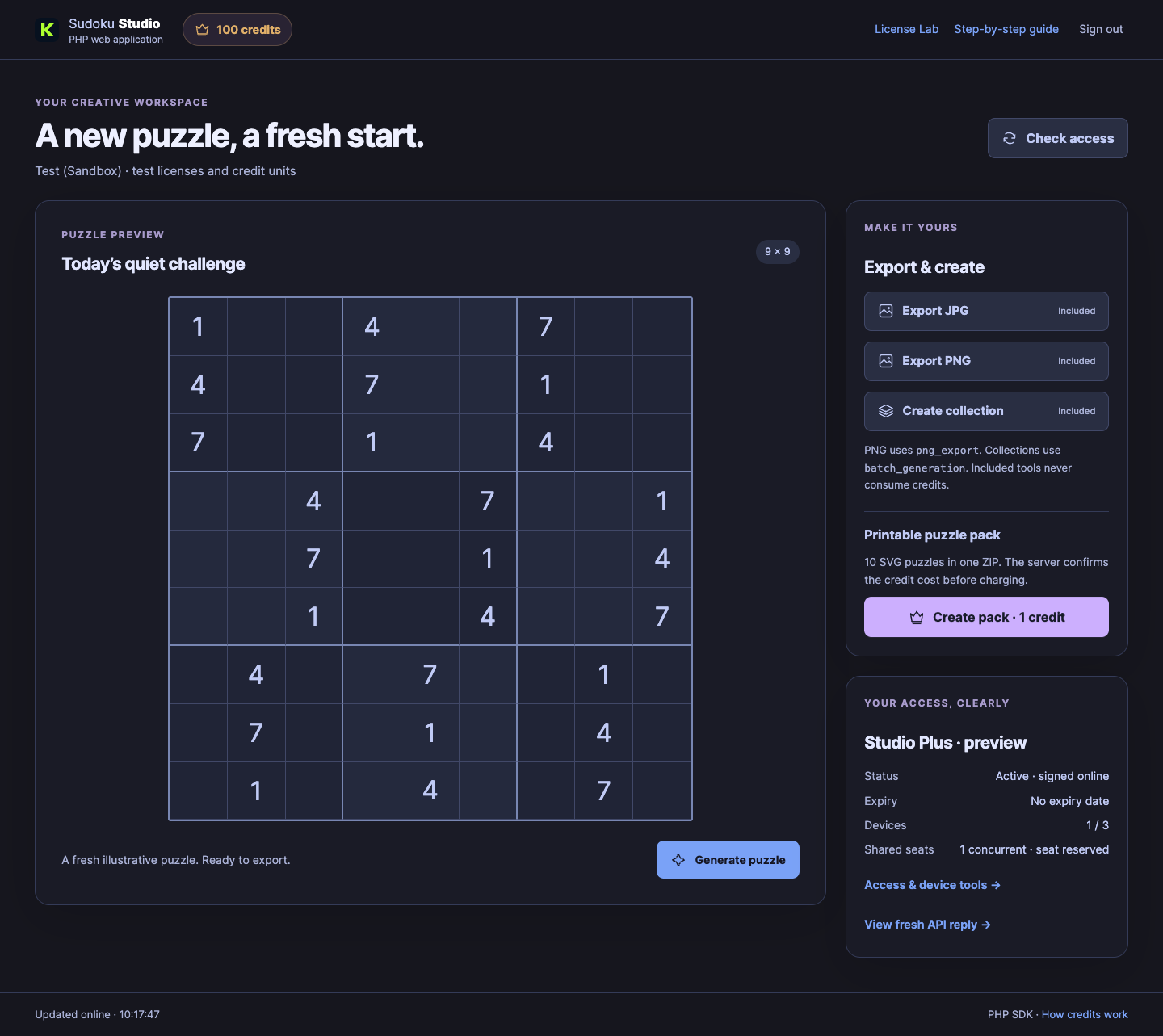
Click Generate puzzle for a fresh illustrative Sudoku. Export JPG works with an active license. Export PNG needs the plan feature png_export; Create collection needs batch_generation. The app checks the actual signed result before doing either. Puzzles are demonstrations, not uniqueness-certified Sudoku puzzles.
3. Give one plan its own tools
In your developer workspace open Plans & features. Create or edit a software plan for this App ID. Add png_export and batch_generation as feature keys if you want both tools. Issue a license on that plan. Plan edits that apply only to new licenses do not silently change existing licenses: use the explicit existing-license option or a license override.
Work in test mode
SandboxChoose Sandbox before creating tutorial licenses.
This changes the dashboard view. The application example also explicitly uses SANDBOX; it does not read your browser choice.
For a PHP server select Web or Desktop + Web. Business lets you restrict this per plan; Starter and Pro allow both app families. The PHP app’s device fingerprint describes its server installation, not the visitor’s physical computer.
4. Add credits without locking the included tools
The crown at the top shows the real license balance. Zero credits still opens the app and leaves included tools available. Create pack is a separate paid action. It makes ten SVG puzzle files in a ZIP, using the price configured by the publisher.
In the developer workspace select Usage credits → Settings, select this product and environment, then add action key create_pack, a clear title and a positive unit price. Turn on usage credits for the software license. Use Balances to add units manually with a reason, or create a credit code below. Do not add a second license just to top up an existing one.
Give a customer a code
Open Usage credits → Codes. Select product, environment, units, availability dates and usage limits. A code such as KDP100CR is just an example; it will work only after you create it for the relevant product and environment. Customers click the crown in Sudoku Studio, enter the code and choose Redeem code. The balance updates on the same license. Limits and expiry are enforced by the server.
Sell a top-up in your own store
Connect WooCommerce and update the KDPika connector to 0.8.0 or later. In Usage credits → Packs, choose the connected store, product, units and price, then sync. The plugin creates or updates the credit product. The customer chooses a pack from the app or My Account → Usage credits, then pays in the store. Only a verified eligible order adds the units, once, to the selected license. Final tax and discounts are shown at checkout. No pack appears until a developer has configured one.
Recover a delayed operation
A pack job has a saved request reference. If the reply is interrupted, use Recover unfinished pack. It reuses that reference, so a completed consume is not charged twice. Keep the original pending code or job until its result is known. Refunds follow the original credit source; spent units can require publisher review.
5. Try shared seats and device tools
Click Access & device tools. On a floating software plan you can reserve or return a seat and open a second test installation. It is a real activation, can use a device slot and is subject to your seat limit. Release the second installation afterwards. Unlink this device removes the current activation. Shared seats renew while the page is active; an abandoned session expires according to your plan timeout.
Try signed offline access deliberately blocks one app request after a fresh online check. It does not switch off your internet connection. Credit operations require an online check, and the offline policy may refuse access.
6. See the real response
Click View fresh API reply. The app makes a new request and shows its time, HTTP status and response. The SDK verifies the original signed bytes. Keys, tokens, email and exact signed bytes containing private data are hidden in the viewer; this redaction does not change signature verification.
Run the PHP app on your own computer
Download PHP Sudoku Studio 1.0.0. Extract it and open a terminal in the extracted folder. You need 64-bit PHP 8.2+ with cURL and sodium; the zip extension is needed for paid puzzle packs. No Composer, platform database or management API key is needed for this example.
php -S 127.0.0.1:8080 -t public public/index.php
Open http://127.0.0.1:8080/sudoku-studio, enter the four settings in the form and click Open. Stop the local server with Ctrl+C. On shared hosting point the domain document root to public/; keep storage/, sdk/ and app/ outside the public document root, enable HTTPS and give PHP write access to private storage. The built-in PHP server is for local testing.
Prefer a desktop application?
Download Python Sudoku Studio 1.3.0 or follow the Python desktop walkthrough. The desktop app uses PyQt6; its GPL-3.0 license is separate from the MIT SDK license. The previous first-project downloads and License Lab remain available.
If something stops
Wrong environment: select the same Test/Live environment as the key. No free seats: close another installation or release a stuck session in the customer portal. No credits: use included tools or top up the same license. PNG not included: the software plan needs png_export. No packs: the publisher must create and sync packs for this product and environment. Desktop-only license: select a software plan that permits Web for this PHP example.